
The short answer
Do website forms fall under HIPAA? The HIPAA rules cover health details that a covered practice gets in any format, including on a web page. The rules below do not mention contact forms. Ask only for a name, a phone number or email, and a short reason. Add a note: no health details. Send care, records and bills to the phone or patient portal.
This is general information, not legal advice.
What does HIPAA cover on a practice website?
HIPAA is the Health Insurance Portability and Accountability Act, a federal law. Its Privacy Rule protects some health details. The rules sit in the Code of Federal Regulations (CFR), the book of federal rules. Here are three points from it, in plain words (45 CFR 160.103):
- Protected health information. This is information about a person’s health, their care or payment for their care. A health care provider, health plan, employer or health care clearinghouse creates or receives it. It identifies the person, or could reasonably be used to identify them.
- Any format. It is covered whether it is sent or kept electronically or in any other form. There are a few exceptions, such as employment records a practice keeps as an employer.
- Covered entity. A health care provider is one if it sends any health information electronically in connection with a transaction the rules cover. A transaction means sending information between two parties for financial or administrative tasks in health care, such as health care claims.
A covered entity may use or share protected health information only as the Privacy Rule allows or requires. With some exceptions, it must make reasonable efforts to limit the information to the minimum needed for the purpose (45 CFR 164.502).
It must have appropriate safeguards. It must also reasonably protect the information from uses or sharing the rule does not allow, by accident or on purpose (45 CFR 164.530).
A practice may be a covered entity. If you are not sure whether yours is, ask a lawyer. A form that never asks for health details has less to protect. That is a way to collect less. I am not saying it makes any form meet a law. No form, tool or website can promise that.
What should a practice contact form ask for?
Only what the front desk needs to call back. In my years on the billing side, I saw what the front desk needed to return a call or a web message. It was a name, and a phone number or email.
A short reason helps the desk send the message to the right person. Use a drop-down list, such as “new patient”, “billing question” or “something else”. People can’t type a story into a drop-down.
Leave out a field for birth date. The desk can ask on the call, once it knows who it is. Leave out insurance member IDs and card photos. The desk checks insurance by phone or at check-in.
Leave out symptoms and health history, too. Care questions belong on a call or in the patient portal. Never add a file upload for records, photos or test results. If you keep a free-text message box, put the notice right above it.
What should a booking request or an email never ask for?
The same idea covers every way in from your website. A contact form, an online booking request and the email address on your site should never ask for:
- A birth date, an insurance member ID or a photo of an insurance card.
- Symptoms, health history or the reason for a visit in the patient’s own words.
- Records, test results or photos.
- A payment card number.
A booking request form needs the same callback details, plus the kind of visit from a short list. If your practice already uses an online scheduling system, link to it instead of building a new form. To choose between a call, a request and real-time booking, see online booking for a medical practice.
Email is harder, because people can type anything. HHS (the U.S. Department of Health and Human Services) answers this in a question-and-answer page (HHS email FAQ):
- The Privacy Rule lets covered providers email patients if they use reasonable safeguards. One example is to limit the amount or type of information in an unencrypted email. Encryption scrambles data so only the right people can read it.
- A patient may start an email. Then the provider can assume email is acceptable to that patient, unless the patient has said otherwise.
What should the form’s notice say?
It should say, in plain words, not to send patient information. Put it right above the submit button, where people see it last.
The ClinicBuilds contact form shows this line above the submit button: “Please don’t include any patient information in this form.”
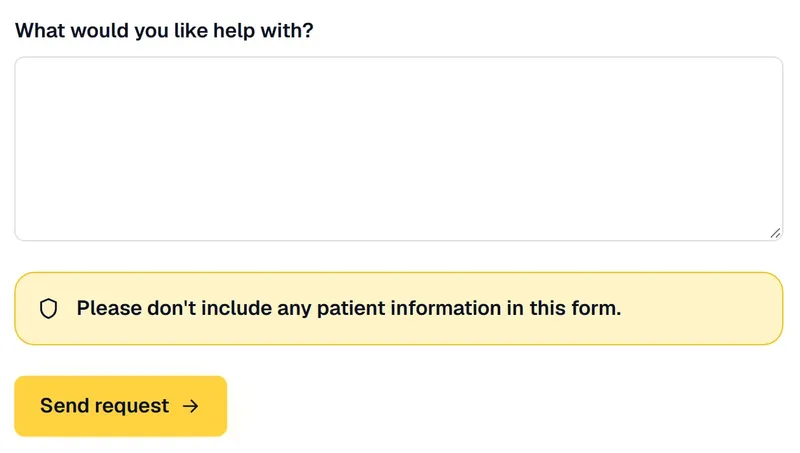
You can add a second sentence that says where to go. Here is an illustrative notice you can copy:
Please don’t include any patient information in this form. To ask about your care, your records or a bill, call [phone number].
Keep it short. A long notice gets skipped. Make it as easy to see as the button.
What happens to a form message after someone presses send?
It goes wherever your form sends it, and someone has to handle it. That can be an inbox, a help-desk app that tracks each message, or your practice’s own systems.
So a message with health details does not just sit in an inbox. It can become part of the patient’s account. That is one more reason to ask for less.
For comparison, the ClinicBuilds contact form asks only for contact and practice details, such as a name, a practice name and an email. A phone number is optional. The details are sent by email and are not stored in a database. The form does not ask for patient information and does not accept it.
Where should care questions, records and bills go instead?
To the phone or to your patient portal, the site where patients log in to their own account. Tell people that on the page.
The Privacy Rule also covers how a covered health care provider sends protected health information to a patient. The provider must let patients ask to get these messages another way or at another place. It must agree to reasonable requests. It may not make the patient say why as a condition (45 CFR 164.522).
One simple habit helps: the front desk can ask each patient how they want to be reached, and then use that.
Show your phone number at the top of every page. A new website from ClinicBuilds includes click-to-call. The guide on routine patient questions shows which calls should stay on the phone.
When does a form vendor become a business associate?
When it handles protected health information for you. If your form takes none, there is less for a vendor to handle.
- Who counts. Under HIPAA, a business associate is, generally, a person or company that acts on behalf of a covered entity. It creates, receives, keeps or sends protected health information for a task the rules cover. People in the practice’s own workforce, such as its employees, are not business associates (45 CFR 160.103).
- The written agreement. A covered entity may let a business associate do this only with satisfactory assurance that it will appropriately safeguard the information. That assurance must be in a written contract or other written agreement (45 CFR 164.502). HHS calls it a business associate agreement.
- An example. HHS gives examples of business associates. One is a cloud service provider hired to process or store electronic protected health information for a covered entity (HHS business associate guidance, last reviewed October 21, 2026).
The HIPAA Security Rule covers protected health information that is kept or sent electronically. It requires technical steps to guard that information against unauthorized access while it travels over a network. Encryption is marked “addressable” (45 CFR 164.312).
Addressable does not mean optional. A covered entity or business associate must judge whether encryption is reasonable and appropriate for it, and use it if so. If not, it must write down why. Then it must use an equal alternative if that is reasonable and appropriate (45 CFR 164.306).
Checklist: a callback-only contact form
Sources
Next step
To have your contact form and the fields it collects checked, ask for a free presence review.